Global Properties
The Global Properties category contains settings that affect the server side behaviour of the mod. These are the default properties for the server.
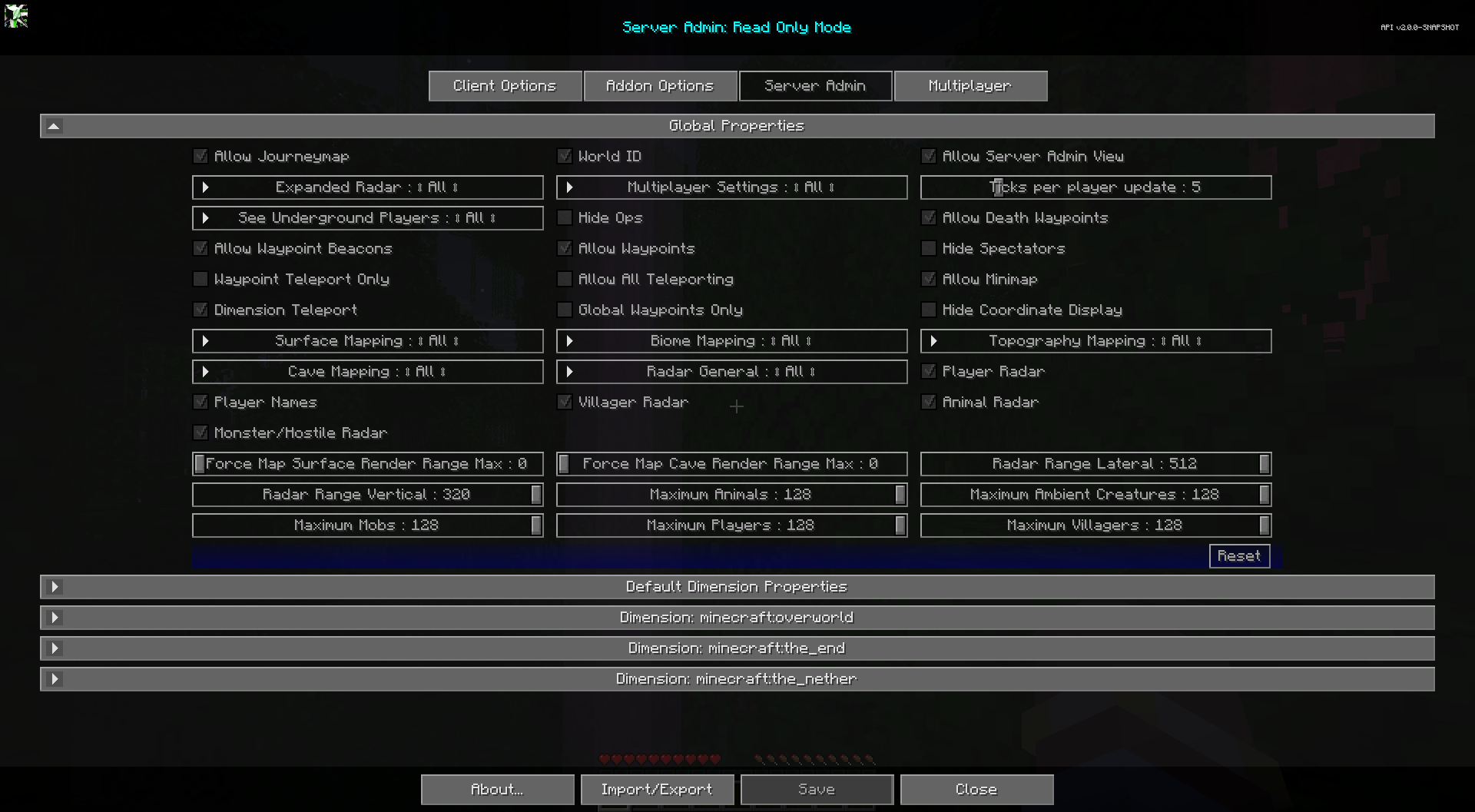
Toggles
The default state for each toggle below is marked with bold text.
| Toggle | Description |
|---|---|
| Allow Journeymap | Whether to allow journeymap to function for non-ops. |
| World ID | Enabling will change the save directory for this server's mapping data. The primary use is to prevent maps and settings from being over-written when using a multi-world setup and when users do not give servers unique names. WARNING: If disabled and then enabled on an active server it will reset all user mapping data. |
| Allow Server Admin View | Whether non op users can view the server admin screen in read-only mode. |
| Allow Minimap | Whether to allow the client minimap. When disabled the minimap is unavailable to players. |
| Hide Coordinate Display | Hides all coordinate displays and prevents editing of coordinate values for waypoints. Replaces most coordinate displays with "Unknown Location" text. Note: This does not affect existing waypoint names. |
| Allow Waypoints | Whether to allow waypoints. Fully disables map and in-game beacon rendering and associated screens. |
| Allow Waypoint Beacons | Whether to allow rendering of in-game beacons. (does not disable map waypoints) |
| Allow Death Waypoints | Whether to allow Death Waypoints to be created on user death. |
| Global Waypoints Only | When enabled, players can only view and toggle the visibility of global waypoints. Creating, editing, and deleting personal waypoints is disabled. |
| Allow All Teleporting | Allows Waypoint and Fullscreen Context menu teleporting. Waypoint Only Teleporting takes priority! |
| Waypoint Teleport Only | When enabled, players may only teleport via waypoints. Arbitrary map right-click teleport is disabled. |
| Dimension Teleport | Enable Cross Dimension Waypoint teleporting for non-op users. OP Users can use it always. |
| Player Radar | If players can see other players on the map. |
| Player Names | If players can see other player's names on the map. |
| Villager Radar | If players can see villagers on the map. |
| Animal Radar | If players can see animals on the map. |
| Monster/Hostile Radar | If players can see monsters or hostile entities on the map. |
| Hide Ops | Hide Ops on radar when Expanded Radar is enabled. |
| Hide Spectators | Whether to hide spectators on the radar. |
Other Settings
The default option for each setting below is marked with bold text.
| Setting | Options | Description |
|---|---|---|
| Multiplayer Settings |
|
Whether to allow All players, Op players, or No players to use the multiplayer settings menu. |
| Radar General |
|
|
| Expanded Radar |
|
If player radar is enabled, allows the server to track players outside of the client's range. Players can see each other anywhere in the same dimension. |
| See Underground Players |
|
Expanded Radar only. Whether underground players are visible on the radar. The Nether is unaffected by this setting. |
| Ticks per player update |
|
How often the server will send player location updates. |
| Radar Range Lateral |
|
Lateral distance (in blocks) to search for and display entities on Radar. Larger numbers may cause significant lag. |
| Radar Range Vertical |
|
Vertical distance (in blocks) to search for and display entities on Radar. Larger numbers may cause significant lag. |
| Maximum Players |
|
The maximum number of players displayed on Radar. Larger numbers may cause lag. |
| Maximum Villagers |
|
The maximum number of villagers displayed on Radar. Larger numbers may cause lag. |
| Maximum Animals |
|
The maximum number of passive mobs displayed on Radar. Larger numbers may cause lag. |
| Maximum Ambient Creatures |
|
The maximum number of ambient mobs displayed on Radar. Larger numbers may cause lag. |
| Maximum Mobs |
|
The maximum number of hostile mobs displayed on Radar. Larger numbers may cause lag. |
| Surface Mapping |
|
Surface Mapping for All, Ops, None. |
| Topography Mapping |
|
Topography Mapping for All, Ops, None. |
| Biome Mapping |
|
Biome Mapping for All, Ops, None. |
| Cave Mapping |
|
Cave Mapping for All, Ops, None. |
| Force Map Surface Render Range Max |
|
Force all players to a maximum chunk surface render distance for the map. 0 to use client settings. This setting only forces the max, it does not increase render range. |
| Force Map Cave Render Range Max |
|
Force all players to a maximum chunk cave render distance for the map. 0 to use client settings. This setting only forces the max, it does not increase render range. |