Waypoint Beacon Settings
By default, waypoints are displayed in the world using a beacon beam in the distance, which allows you to see where they are from anywhere in the world. You can look towards the beam and see the waypoint's icon and label as well. This behaviour can be customized below.
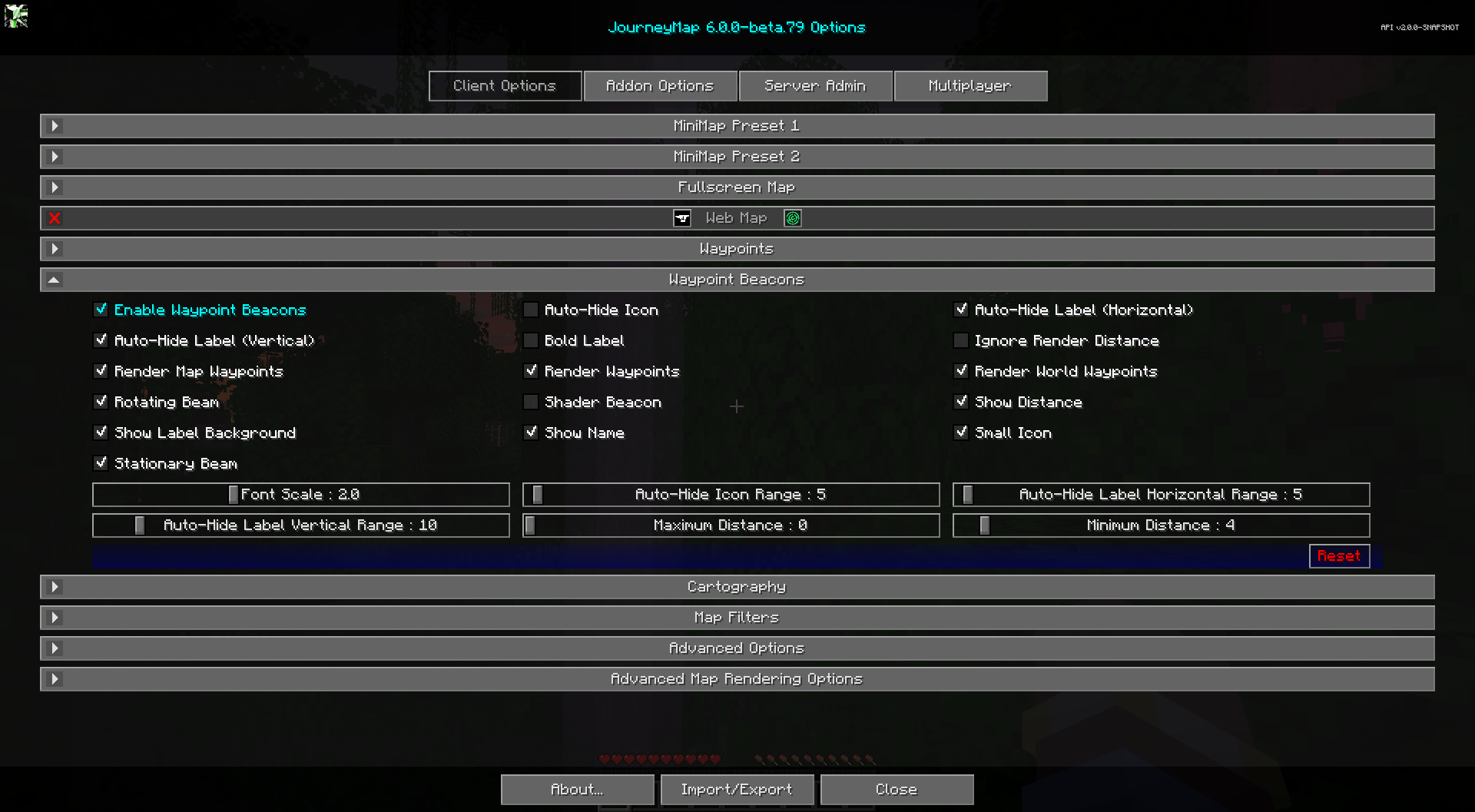
Toggles
The bold toggle settings below are enabled by default.
| Toggle | Description |
|---|---|
| Render World Waypoints | Disables/Enables rendering of all waypoints in world. This does not change whether waypoints are enabled or disabled |
| Enable Waypoint Beacons | Show in-game beacons of your waypoints |
| Auto-Hide Icon | Auto-Hides the Waypoint icon, if disabled it will always show. |
| Ignore Render Distance | Ignore the vanilla render distance setting, enabling this feature is useful when mods that expand beyond visuals vanilla render distance are present. |
| Stationary Beam | Use a stationary inner beam for the waypoint beacons |
| Rotating Beam | Use a rotating outer beam for the waypoint beacons |
| Show Name | Show the name of the waypoint in its label |
| Show Distance | Show the distance (in blocks/meters) to the waypoint in its label |
| Auto-Hide Label (Horizontal) | Hide waypoint labels when you're not looking toward them horizontally. |
| Auto-Hide Label (Vertical) | Hide waypoint labels when you're not looking toward them vertically. |
| Bold Label | Use bold waypoint labels on beacons |
| Show Label Background | Show the background rectangle behind waypoint beacon labels |
| Small Icon | Use a small icon for the waypoint beacons |
| Shader Beacon | Lets shaders do their thing on waypoint beacons. May have unexpected results. (Fabric only) |
Other Settings
The default option for each setting below is marked with bold text.
| Setting | Options | Description |
|---|---|---|
| Auto-Hide Icon Range |
|
Adjust the angle in which the icon will auto hide. |
| Auto-Hide Label Horizontal Range |
|
Adjust the horizontal angle in which the label will auto hide. |
| Auto-Hide Label Vertical Range |
|
Adjust the vertical angle in which the label will auto hide. |
| Font Scale |
|
The font scale for labels and text |
| Maximum Distance |
|
The maximum distance from you (in blocks/meters) that a waypoint should be displayed. Affects both waypoints on maps and waypoint beacons. Set to 0 for no maximum. |
| Minimum Distance |
|
The minimum distance from you (in blocks/meters) that a waypoint beacon should be displayed. Set to 0 for no minimum. |