Minimap Settings
JourneyMap allows you to have two minimap presets. Each preset represents a separate set of settings - essentially allowing you to have two distinct minimaps available to switch between.
Note
The settings for each minimap are identical, so we'll only cover a single preset below.
To switch between minimap presets, press the switch minimap preset key (the \ key by default).
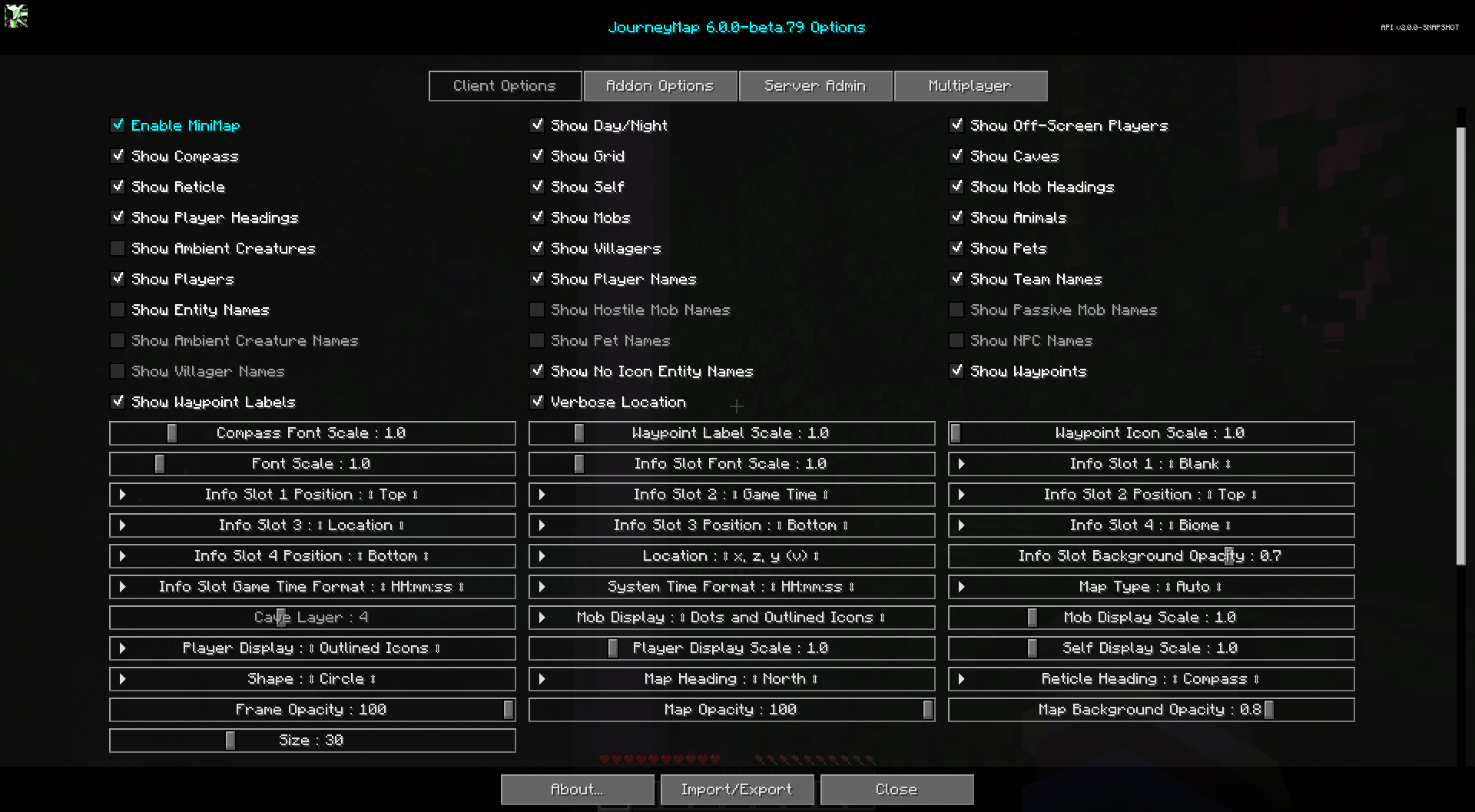
Toggles
The toggles whose names are shown in bold are enabled by default.
| Toggle | Description |
|---|---|
| Enable MiniMap | Display the MiniMap in-game |
| Show Day/Night | Switch to Day or Night map automatically |
| Show Caves | Switch to Cave map when underground or indoors |
| Show Compass | Show compass points on the MiniMap frame |
| Show Reticle | Show a reticle (crosshairs) on the MiniMap |
| Show Grid | Show a grid of chunk boundaries on the map |
| Show Self | Your locator icon is shown on the map |
| Show Player Headings | Show which direction other players are looking |
| Show Mob Headings | Show which direction mobs are looking |
| Show Mobs | Nearby hostile mobs are shown on the map |
| Show Animals | Nearby passive mobs are shown on the map |
| Show Ambient Creatures | Nearby ambient creatures, like bats, are shown on the map |
| Show Villagers | Nearby villagers are shown on the map |
| Show Pets | Nearby pets are shown on the map |
| Show Players | Nearby players are shown on the map |
| Show Off-Screen Players | Visible players that are off-screen have their icon rendered on the minimap border |
| Show Waypoints | Nearby waypoints are shown on the map |
| Show Waypoint Labels | Show waypoint labels on the map |
| Verbose Location | Location shows coordinate names (x, y, z) with the numbers |
| Show Player Names | Show names of players on the map |
| Show Team Names | Show names of teams on the map |
| Show Entity Names | Show names of pets, NPCs, etc. on the map |
| Show Hostile Mob Names | Show names of hostile mobs on the map |
| Show Passive Mob Names | Show names of passive mobs on the map |
| Show Ambient Creature Names | Show names of ambient creatures on the map |
| Show Pet Names | Show names of pets on the map |
| Show NPC Names | Show names of NPCs on the map |
| Show Villager Names | Show names of villagers on the map |
| Show No Icon Entity Names | Show names for entities that have no icon. This overrides all other name toggles |
Info Slots
Info slots are text areas above and below the minimap that show extra contextual information. There are four of them, numbered 1 through 4. Each slot has its own label source (what it shows) and a position (Top or Bottom of the minimap).
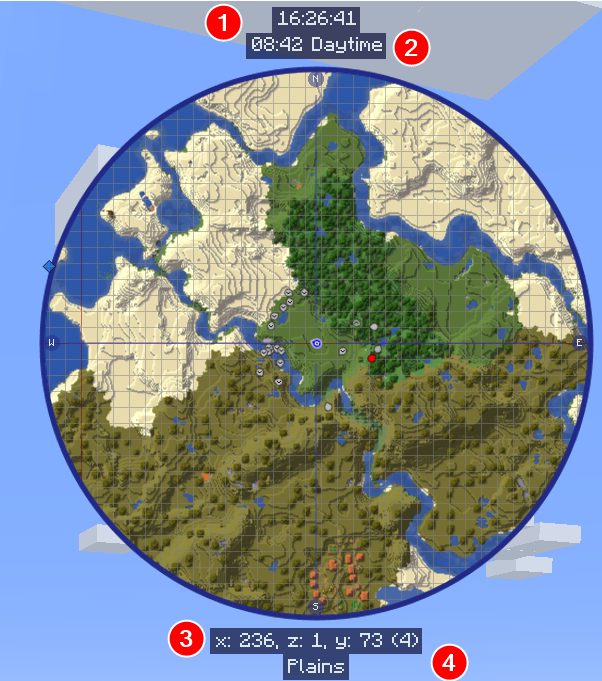
Each info slot label source can be set to one of the following:
- Blank: Nothing, hide this info slot
- Biome: The biome of your location
- Dimension: The dimension you are currently in
- FPS: The current Frames Per Second
- Game Time: The world time (20 minute cycle), with a new day at 6am. This is the default Minecraft time
- Game Time with Offset: The world time offset by 6 hours, so a new day starts at midnight
- Light Level: The light level of the block at your feet
- Location: Your current coordinates
- Minecraft Day: The current day number in the world
- Moon Phase: The current moon phase
- Movement Speed: Your movement speed in blocks per second
- Region: Your current region coordinates
- System Time: The current time according to your computer's clock
- Weather: The current weather for the dimension
Each info slot also has a position setting:
| Setting | Options | Description |
|---|---|---|
| Info Slot 1 Position |
|
Whether Info Slot 1 sits above or below the minimap |
| Info Slot 2 Position |
|
Whether Info Slot 2 sits above or below the minimap |
| Info Slot 3 Position |
|
Whether Info Slot 3 sits above or below the minimap |
| Info Slot 4 Position |
|
Whether Info Slot 4 sits above or below the minimap |
By default, Info Slot 1 is Blank, Info Slot 2 shows Game Time, Info Slot 3 shows Location, and Info Slot 4 shows Biome.
Other Settings
The default option for each setting below is marked with bold text.
| Setting | Options | Description |
|---|---|---|
| Map Type |
|
Locks the Map Type to this value. (Nether is always cave, but you can force a slice when set to underground) |
| Cave Layer |
|
The vertical slice to lock the minimap to when Map Type is set to underground. Disabled otherwise. |
| Shape |
|
The shape of the MiniMap. Note: Only Circle supports the "My Heading" Map Heading. |
| Size |
|
The size of the MiniMap, as a percentage of the window size. Sizes over 768px may hurt performance. |
| Map Heading |
|
The orientation (rotation) of the MiniMap. Note: Only Circle supports the "My Heading" Map Heading. |
| Reticle Heading |
|
The orientation (rotation) of the reticle on the MiniMap. |
| Frame Opacity |
|
How opaque the MiniMap frame is (as a percentage). |
| Map Opacity |
|
How opaque the map is (as a percentage). |
| Map Background Opacity |
|
How opaque the map background is. |
| Compass Font Scale |
|
The font scale used for compass point labels. |
| Font Scale |
|
The font scale for labels and text. |
| Info Slot Font Scale |
|
The font scale used for info slots. |
| Info Slot Background Opacity |
|
The opacity of the Info Slot background. |
| Info Slot Game Time Format |
|
Time format for the game time info slot. |
| System Time Format |
|
Time format for the System Time info slot. |
| Location |
|
The format of how location coordinates are displayed. Note: 'v' stands for vertical chunk. |
| Mob Display |
|
How mobs should be displayed on the map. |
| Mob Display Scale |
|
The scale for Mob icons and dots. |
| Player Display |
|
How other players should be displayed on the map. |
| Player Display Scale |
|
The scale for Player icons and dots. |
| Self Display Scale |
|
The scale for your own icon. |
| Waypoint Icon Scale |
|
The scale for waypoint icons on the map. |
| Waypoint Label Scale |
|
The font scale for waypoint labels on the map. |