Paramètres des points de cheminement
Cette catégorie vous permet de modifier certains paramètres relatifs au comportement et à l'affichage des waypoints. Les waypoints disposent également d'un certain nombre de paramètres individuels - vous pouvez les découvrir sur la page des waypoints.
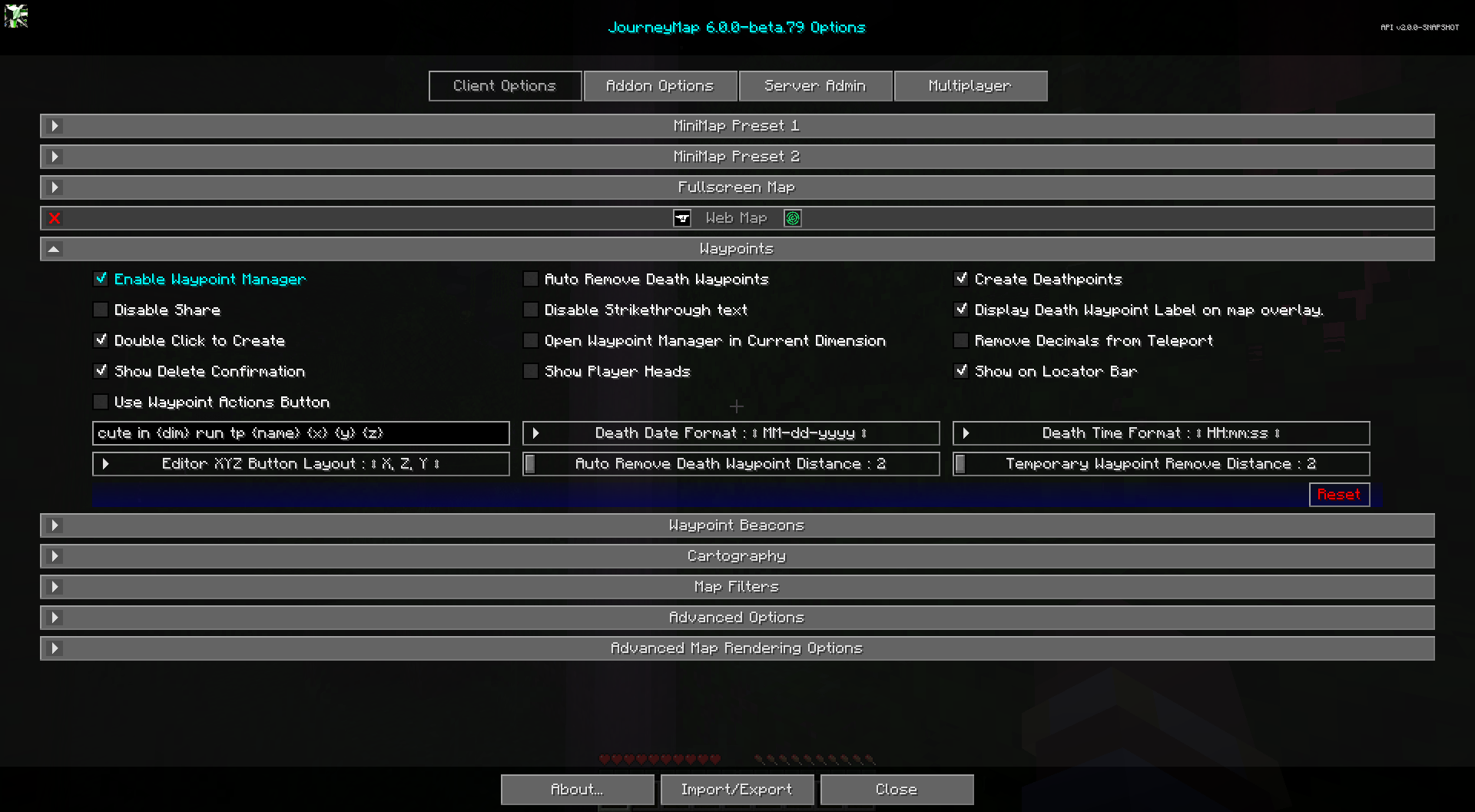
Toggles
Les paramètres de bascule gras ci-dessous sont activés par défaut.
| Basculer | Descriptif |
|---|---|
| Activer le gestionnaire de points de cheminement | Activez le gestionnaire de points de cheminement. Si vous utilisez un autre mod pour gérer les waypoints, vous devez le désactiver. |
| Afficher la confirmation de suppression | Afficher une invite de confirmation avant de supprimer un waypoint. Cela peut également être activé à partir de la boîte de dialogue de suppression elle-même. |
| Désactiver le partage | Désactive le bouton de partage dans le Waypoint Manager et dans le menu contextuel plein écran Chat Position. |
| Désactiver le texte barré | Désactive le barrage du texte du waypoint pour les waypoints désactivés. |
| Utiliser le bouton d'actions de point de cheminement | Utilisez une seule liste déroulante d'actions par waypoint au lieu de la liste des boutons d'image. L’utilisation d’un seul bouton permet un affichage de texte plus grand. |
| Ouvrir Waypoint Manager dans la dimension actuelle | Ouvre le Waypoint Manager axé sur la dimension dans laquelle vous vous trouvez actuellement. |
| Créer des points de mort | Créez automatiquement un waypoint à l'endroit où vous mourez. |
| Afficher les têtes des joueurs | Montrez les têtes des joueurs dans le monde à leur emplacement. Fonctionne uniquement sur un serveur sur lequel JourneyMap est installé avec le radar étendu activé. |
| Supprimer les décimales de la téléportation | Certains serveurs ne prennent pas en charge la téléportation au centre d'un bloc, cette option utilise donc des nombres entiers au lieu d'ajouter 0,5 à la valeur. |
| Afficher l'étiquette du point de cheminement de la mort on superposition de carte |
Indique s'il faut afficher le nom des waypoints de la mort sur votre mini-carte et sur la carte plein écran . |
| Double-cliquez pour créer | Un double-clic sur la carte en plein écran créera un waypoint à l'emplacement. |
26.1 et plus récent
Cette catégorie dispose également d'une bascule Afficher sur la barre de localisation, qui affiche waypoints sur la barre de localisation vanille au-dessus de la barre de raccourcis. Le localisateur la barre est une fonctionnalité de Minecraft 1.21.6+, cette option n'est donc présente que dans JourneyMap pour Minecraft 26.1 et versions ultérieures (la ligne 26.x), pas sur le Ligne 1.21.1.
Autres paramètres
L'option par défaut pour chaque paramètre ci-dessous est marquée d'un texte en gras.
| Paramètre | Options | Descriptif |
|---|---|---|
| Disposition des boutons XYZ de l'éditeur |
|
Sélectionnez le format des boutons X, Y, Z dans l'éditeur de waypoints. Single Field utilise un champ pour les valeurs séparées par des virgules, utile pour copier et coller à partir de sources externes. |
| Commande de téléportation de waypoint personnalisée | Saisie de texte : /execute dans {dim} run tp {name} {x} {y} {z} | Définissez la commande de téléportation utilisée lorsque vous vous téléportez vers un waypoint, en utilisant les espaces réservés suivants :
|
| Distance du point de cheminement de la mort à suppression automatique | 2 à 64 | La distance à laquelle un waypoint mortel est supprimé. Minimum 2, sinon il sera supprimé dès sa création. |
| Waypoint temporaire Supprimer la distance | 2 à 64 | La distance du joueur à laquelle les waypoints temporaires sont automatiquement supprimés. |
| Format de la date de décès |
|
Le format de texte de la date du décès, tel qu'indiqué sur l'étiquette du waypoint du décès.
|