Full-Screen Map Settings
Translation needed for 6.0
This page was updated for JourneyMap 6.0 in English. Translation is pending; the content shown is the English source. See Contributing to help translate the docs.
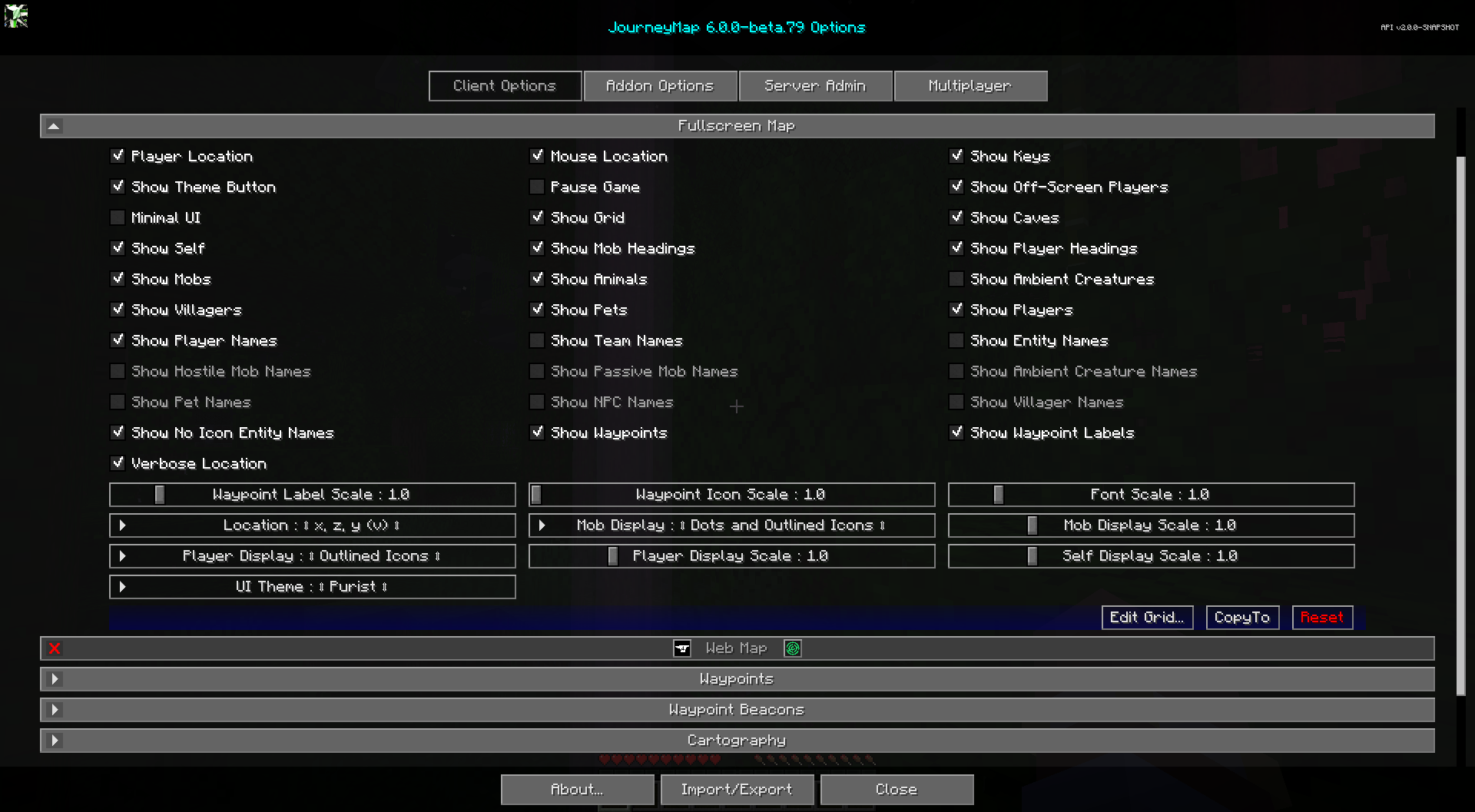
The full-screen map provides a large, scrollable view of your entire map. Just like the minimap presets, it can be customized to a great deal.
To switch open the full-screen map, press the full-screen map key (the J key by default).
Note
A handful of the following options are also available as buttons on the full-screen map view itself. For more information on this, please see the full-screen map page.
Toggles
The default state of each toggle is shown in the table below. Toggles that are bold are enabled by default.
| Toggle | Description |
|---|---|
| Mouse Location | Show mouse block location above the buttons |
| Pause Game | Pauses the game while the fullscreen map is open. Only affects singleplayer worlds |
| Player Location | Show player location below the top buttons |
| Show Animals | Nearby passive mobs are shown on the map |
| Show Ambient Creatures | Nearby ambient creatures, like bats, are shown on the map |
| Show Caves | Switch to Cave map when underground or indoors |
| Show Entity Names | Show names of pets, NPCs, etc. on the map |
| Show Grid | Show a grid of chunk boundaries on the map |
| Show Hostile Mob Names | Show names of hostile mobs on the map |
| Show Keys | Show key bindings and descriptions |
| Show Mob Headings | Show which direction mobs are looking |
| Show Mobs | Nearby hostile mobs are shown on the map |
| Show NPC Names | Show names of NPCs on the map |
| Show No Icon Entity Names | Show names for entities that have no icon. This overrides all other show name fields |
| Show Off-Screen Players | Visible players that are offscreen will have their icon rendered on the border of the map |
| Show Ambient Creature Names | Show names of ambient creatures on the map |
| Show Passive Mob Names | Show names of passive mobs on the map |
| Show Pet Names | Show names of pets on the map |
| Show Pets | Nearby pets are shown on the map |
| Show Player Headings | Show which direction other players are looking |
| Show Player Names | Show names of players on the map |
| Show Players | Nearby players are shown on the map |
| Show Self | Your locator icon is shown on the map |
| Show Team Names | Show names of teams on the map |
| Show Theme Button | Shows the theme selection button on the fullscreen map |
| Show Villager Names | Show names of villagers on the map |
| Show Villagers | Nearby villagers are shown on the map |
| Show Waypoint Labels | Show waypoint labels on the map |
| Show Waypoints | Nearby waypoints are shown on the map |
| Verbose Location | Location shows coordinate names (x, y, z) with the numbers |
Minimal UI
Minimal UI is a new fullscreen-only toggle in JourneyMap 6.0. It is disabled by default. When enabled, it hides a bunch of the buttons to make the fullscreen map UI a bit more minimal.
Other Settings
The default option for each setting below is marked with bold text.
| Setting | Options | Description |
|---|---|---|
| Font Scale |
|
The font scale for labels and text |
| Location |
|
Format of how location coordinates are displayed. 'v' stands for vertical chunk |
| Mob Display |
|
Show mobs as icons or colored dots |
| Mob Display Scale |
|
The scale for Mob icons and dots |
| Player Display |
|
Show players as icons or colored dots |
| Player Display Scale |
|
The scale for Player icons and dots |
| Self Display Scale |
|
The scale for the self icon |
| Waypoint Icon Scale |
|
The scale for waypoint icons on the map |
| Waypoint Label Scale |
|
The font scale for waypoint labels on the map |